


Compass app - Accurate Compass
4.21.02K Reviews
App Specs
- Version
- 3.1.3
- Updated On
- License
- Free
- Downloads
- 10,000,000+
- Developer
- Battery Stats Saver
- Categories
- Maps & Navigation
- Platform
- Android
Screenshots
 Analysis by AppCompare
Ever found yourself in the middle of nowhere with no sense of direction? Yeah, me too. That's why I decided to give the Accurate Compass app a spin. This nifty little tool promises to keep you on the right track, literally, by turning your smartphone into a precise compass.
What I like about a compass app is that it answers one small, immediate question: which way am I facing? Accurate Compass focuses on that basic job instead of trying to replace a full navigation system. It is a free Maps & Navigation app from Battery Stats Saver, with a 4.1 average from around 57,000 ratings and over 10 million installs. That reach makes it easy to understand why people try it, but the useful test is whether a simple heading is enough for the way you travel.
Getting Started with Accurate Compass
First things first, downloading the Accurate Compass is a breeze. A quick hop onto the app store, a tap on the download button, and boom! It's nestled comfortably on your home screen. The app is lightweight, so it doesn’t hog your phone's memory, which is always a win in my book.
The app is rated for Everyone, and its current version is 3.1.3. It runs on Android 5.0 or later, so older phones may still be able to use it. There are in-app purchases ranging from $0.99 to $99.99 per item, so I would check the purchase screen carefully before confirming anything. The main appeal is that the app is free to start; anyone who only needs a basic bearing can try it without paying upfront.
One practical distinction is worth keeping in mind: a compass tells you a direction, while a map app helps you follow a route. If I am walking through unfamiliar streets, I would use a map to choose turns and this app only when I want to check which way I am facing. For a hike, it can be a handy orientation aid, but it is not a substitute for a route, a marked trail, or a backup plan.
User Interface and Features
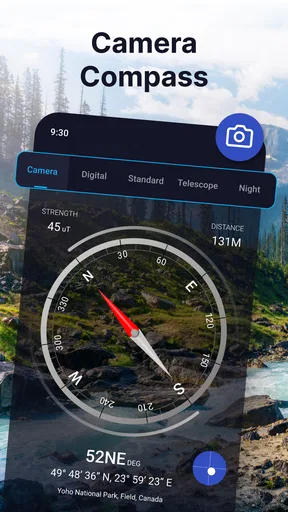
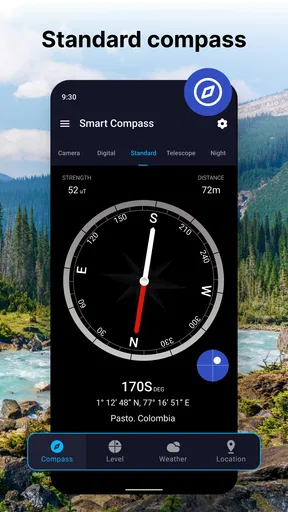
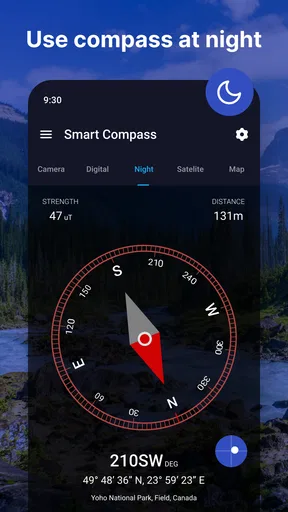
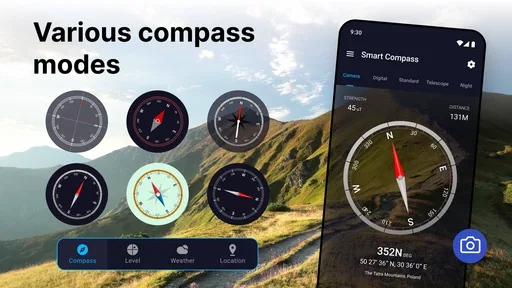
Once you open it, the interface is as straightforward as it gets. No unnecessary frills, just a clean, easy-to-read compass face. If you’re like me and appreciate simplicity, you’ll love this. The compass displays cardinal directions, degree markings, and even a digital readout of your heading.
That readout is more useful than it may first appear. When I need to keep moving in a consistent direction, I can note the heading and check it again after passing an obstacle or taking a short detour. It will not tell me whether I am still on a trail, but it gives me a simple reference to regain my intended direction. This works best over a short stretch in open surroundings, not as a way to navigate an entire unfamiliar area.
Worth Reading Before You Choose

Flipboard Shows What News Apps Must Do Beyond the Feed

Switching to Android Auto Means Rethinking Your Driving Routine

Google Calendar Makes a Crowded Week Easier to Manage

Ludo King Makes the Most of the Minutes Between Plans

Baby Panda World Brings Quick Play to Modern Phones, but Its Game Library Feels Busy

ESPN’s Live Game View Makes Following Close Games Easier
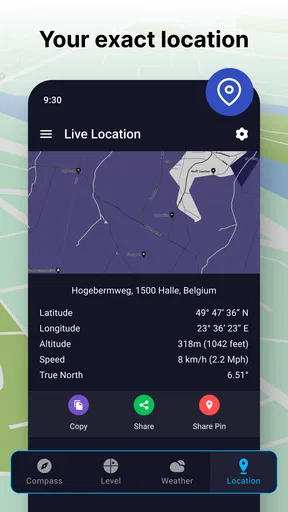
One feature that caught my eye is the magnetic declination adjustment. For those who are serious about their navigation, this is a game-changer. It ensures that your compass is aligned with true north, rather than magnetic north. The app also supports GPS integration, which is handy when you’re out in the wild.
There is a useful habit to build before relying on any phone compass: check the reading while standing still, then rotate slowly and see whether the heading settles consistently. If it looks jumpy, move away from nearby metal objects or electronics and try again. This is not a special trick exclusive to this app; it is a sensible way to work with a phone’s compass sensor. A quick check before setting off is better than discovering a doubtful reading halfway through a route.
The declination option matters most when the distinction between magnetic and true north is relevant to the map or navigation method you are using. For a casual walk around town, many people will not need to adjust it. If you are matching a paper map, though, make sure you understand which north your map uses and set the compass accordingly. The option is helpful, but it does not remove the need to know how to interpret a bearing.
Performance and Accuracy
In terms of accuracy, I took it for a spin during a weekend hike. The Accurate Compass held its ground against my traditional magnetic compass. It was responsive and recalibrated quickly when I made turns. I even tested it in an urban setting, and it didn’t falter amidst the interference from buildings and electronics.
Even so, I would not treat any phone compass reading as unquestionable. A phone’s orientation sensor can be affected by its surroundings, and the phone itself needs to be held in a steady position for a useful reading. If the direction seems inconsistent, pause and check again rather than correcting your route based on one glance. For a serious backcountry trip, I would carry a physical compass and know how to use it; the app is most reassuring as a quick reference or secondary tool.
A realistic everyday use is finding the right direction after leaving a station or parking garage. I can open the compass, orient myself toward a street or landmark, and then switch to a map for the actual route. That is a small but helpful job, especially when the map view alone makes it hard to tell which way I am facing. On the other hand, if I need live turn-by-turn directions, traffic information, or a complete route, a conventional maps app is the better choice.
Battery consumption is minimal, so you can keep it running without worrying about draining your phone. That’s a huge plus for any app that’s going to be used on long trips.
For longer outings, I still would not leave the phone screen on continuously just because the compass seems light on battery. Saving power matters when the same phone may be needed for calls, maps, or an emergency. I would check my bearing when I need it, then put the phone away. That simple workflow preserves the app’s convenience without making it the center of every step of a hike.
Where It Fits—and Where It Doesn’t
This is a good fit for someone who wants an uncomplicated direction check, walks in unfamiliar places, or enjoys outdoor activities and already understands the limits of phone-based navigation. It also makes sense for a traveler who wants a quick sense of orientation without opening a feature-heavy mapping app. The store summary describes it as a simple compass, and that is the right expectation: a focused tool for heading, not an all-in-one navigator.
I would skip it as my only navigation aid for remote travel, for following a detailed route, or whenever a wrong turn could create a safety problem. In those situations, a dedicated GPS device, a reliable map app, or a traditional compass may be more appropriate, depending on the conditions. A paper map and physical compass also do not depend on the phone being available, which is an important trade-off on a long outdoor trip.
Compared with the usual alternatives, this app sits between a basic physical compass and a full map-and-navigation app. A physical compass is independent of the phone and useful with a paper map, but it may take more practice to use confidently. A mapping app can show roads and routes, yet its extra information is unnecessary when all I want is a heading. This app’s strength is that narrower middle ground: quick orientation without the work of unfolding a map or planning a route.
Its release date is March 18, 2020, and it has 874 written reviews alongside its much larger rating count. I would treat those figures as context rather than proof that the compass will behave identically on every phone. Sensor quality and local interference can affect the experience, so trying it in a familiar place first is a sensible way to judge whether it suits your device.
Final Thoughts
Overall, the Accurate Compass app lives up to its name. It's a reliable companion for anyone who needs a dependable direction-finding tool. Whether you're an outdoor enthusiast or someone who just wants to make sure you’re heading the right way, this app is a solid choice.
My recommendation comes with a clear boundary: use it to orient yourself, not to assume that it can guide you through every situation. If you are curious about the in-app purchases, review the options before making a purchase; if you only need a basic compass, there is no reason to buy anything without first deciding what extra value you want. Its simplicity is its appeal, while the need to verify readings and use another tool for routes is the main trade-off.
So, if you ever find yourself lost—or just want to make sure you never get lost—give it a whirl. It might just become your new favorite travel buddy!
Pros
- Highly accurate readings for navigation.
- User-friendly interface and design.
- Works offline without internet.
- Customizable settings and themes.
- Quick calibration feature included.
Cons
- Contains ads that can be distracting.
- Limited advanced features for experts.
- May not work on all devices.
- Some users report minor bugs.
- Requires access to device sensors.
FAQs for Compass app - Accurate Compass
What features does the Accurate Compass app offer?
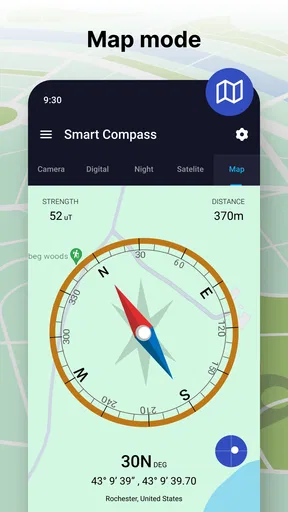
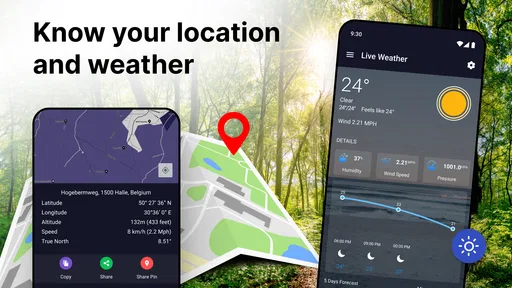
The Accurate Compass app provides a range of features, including precise cardinal directions, a digital readout, and a magnetic declination correction. It also offers a map view for enhanced navigation, altitude tracking, and a user-friendly interface designed to make orientation easy in any environment.
Is the Accurate Compass app available for both Android and iOS?
Yes, the Accurate Compass app is available for download on both Android and iOS platforms. You can find it on the Google Play Store for Android devices and the Apple App Store for iOS devices, ensuring compatibility across a wide range of smartphones and tablets.
Does the Accurate Compass app require an internet connection to function?
No, the Accurate Compass app does not require an internet connection for its basic compass functionality. It uses your device's built-in magnetic sensor to provide accurate direction readings, making it useful in remote areas without network coverage. However, some advanced features, like map view, may require connectivity.
How accurate is the Accurate Compass app compared to a physical compass?
The Accurate Compass app is designed to provide precise readings, often comparable to a traditional physical compass. However, accuracy can depend on your device’s hardware and any magnetic interference in the environment. It’s advisable to calibrate your device’s sensors to ensure optimal performance.
Are there any in-app purchases or advertisements in the Accurate Compass app?
The Accurate Compass app offers a free version with basic features, which may include advertisements. There is also a premium version available for purchase that provides an ad-free experience and additional features such as advanced navigation tools and custom themes, enhancing the overall user experience.


